

You might encounter the following problems when your eSIM isn’t connected to a data network:
- Extremely slow download/upload speeds
- Only "E" (Edge) appears in the signal status, instead of 4G LTE or 5G
- No Internet connection, even though the eSIM shows it’s connected
DO NOT DELETE THE ESIM FROM YOUR PHONE! If it isn’t working, don’t worry-follow the steps below or Contact Us if you need further help.
Manually select a network
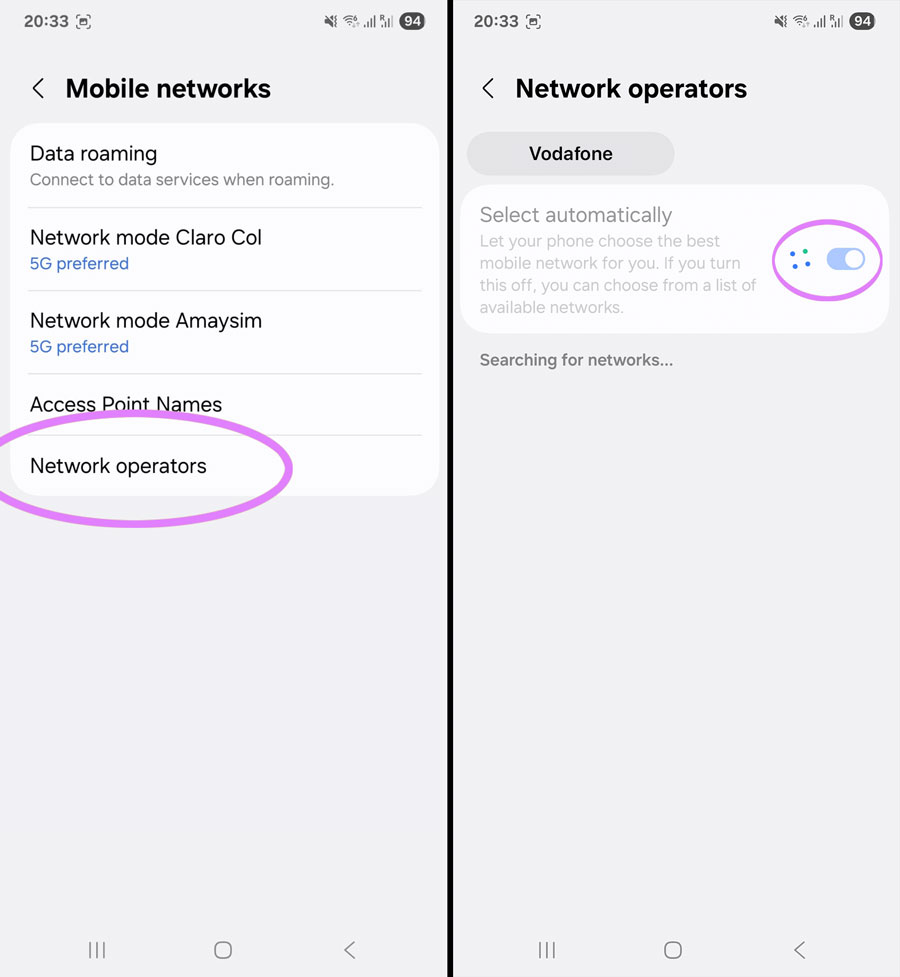
- Open Settings > Connections > Mobile Networks > Network Operators
- Select your Travel eSIM at the top of the screen (if you can see it there)
- Disable "Select Automatically" and allow a few seconds to load the networks
- Please select one of the available networks from the list - you may try more than one as we support many
- Turn on flight mode, wait 30 seconds, turn it off again
Still not working?
Contact us and we'll get you sorted as soon as possible (usually within a few hours). In rare cases there may be no service in the area or a network outage beyond our control, sometimes we may need to replace your eSIM but we'll do everything we can to get you connected.

Get amongst it
Join the community
We will reach out when we launch new products, about our sustainability projects, specials, new innovations or maybe even cool sh*t we think is inbox worthy.


