

What does it mean to 'top up' an eSIM?
Topping up allows you to add another travel plan to a ZenSim eSIM.
Instead of purchasing and installing a completely new eSIM for a different country or region, you can select your existing ZenSim eSIM in the ZenSim app and add another destination or plan to it.
Does the top up need to be for the same country?
No. You can add any available ZenSim destination or plan to your existing eSIM.
For example, if you originally purchased a plan for Japan, you can later add a plan for South Korea, Europe, the United States, or another available destination to the same eSIM.
Does the top up need to be the same type of plan?
No. You can choose any compatible plan available in the ZenSim app. It does not need to have the same data allowance, duration, speed, or destination as your previous plan.
This gives you the flexibility to choose the most suitable plan for each trip.
Can I use one eSIM for a multi-country trip?
Yes. You can add plans for multiple destinations to the same ZenSim eSIM.
For example, if you are travelling through Japan, South Korea, and then on to Germany, you can organise plans for each destination before you leave or while you are travelling.
This can help you avoid installing a separate eSIM for every country.
Is it better to buy a regional plan or separate country plans?
This depends on your itinerary and expected usage.
A regional plan may be more convenient if you are visiting several countries covered by the same plan. Separate country plans often provide better value when you are spending more time in individual destinations.
You can compare the available plans in the ZenSim app before purchasing.
How do I top up my existing eSIM?
You can top up through the ZenSim app:
- Open the ZenSim app.
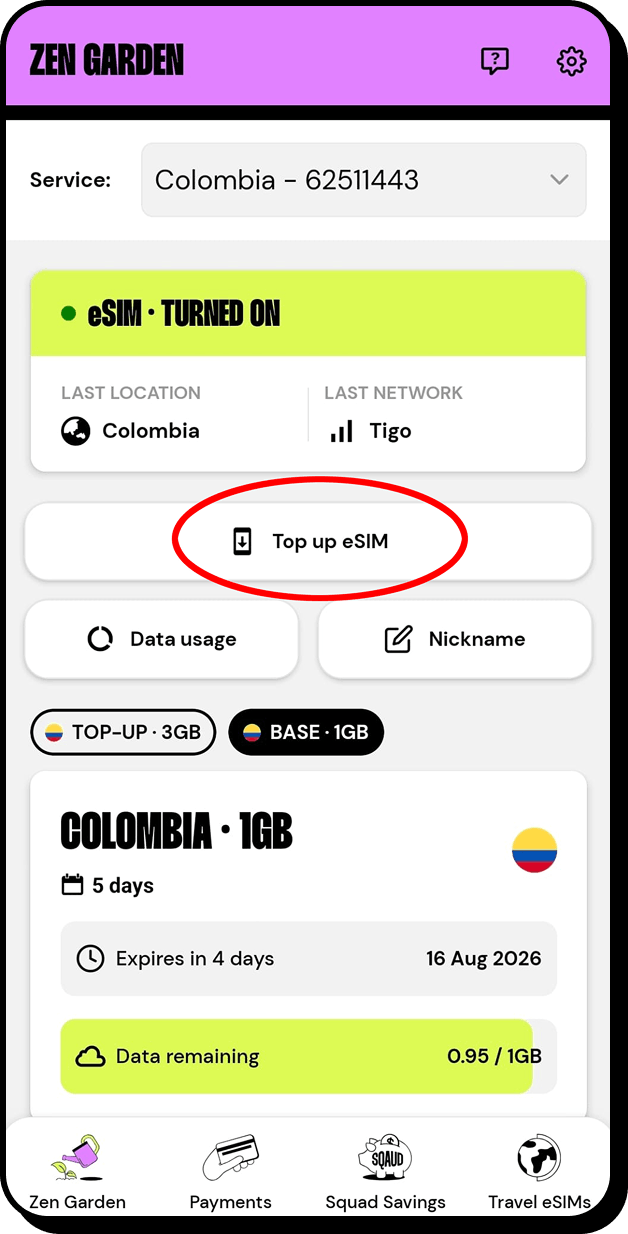
- Select your existing travel eSIM.
- Choose Top Up eSIM.
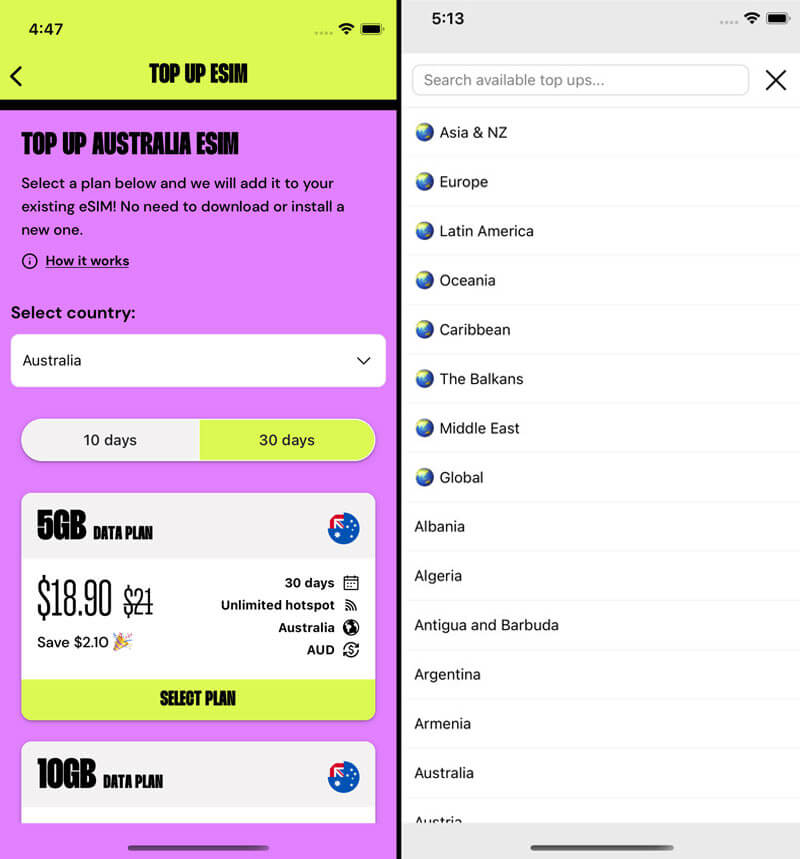
- Select your destination.
- Choose your preferred plan.
- Complete the purchase.
The new plan will be added to the selected eSIM.
Will I need to scan another QR code?
No. When you add a plan to an existing ZenSim eSIM, the new plan is added to the eSIM already installed on your phone.
You should not delete the existing eSIM before completing the top up.
Do I receive a discount for topping up?
Yes. Adding a plan to your existing ZenSim eSIM saves you 10% off the standard new-customer price for that plan.
The discount applies when you use the top-up option for an eligible existing eSIM through the ZenSim app.
Does topping up extend my current plan?
No. A top-up adds another plan to your existing eSIM. It does not change the data allowance, expiry date, or validity period of your current plan.
Each plan has its own allowance, activation conditions, and validity period.
Can I top up before my current plan expires?
Yes. You do not need to wait until your current plan has finished.
You can organise your next country or plan in advance through the ZenSim app. This is particularly useful for multi-country holidays or future trips.
Can I have more than one plan on the same eSIM?
Yes. An existing ZenSim eSIM can have multiple travel plans associated with it.
The plans may cover different countries, regions, durations, or data allowances.
What happens if two plans cover the same country?
If you have more than one plan that can operate in the same country, which plan is used may depend on the plan status, activation conditions, and network configuration.
To avoid unexpected activation or usage, check your active plans in the ZenSim app before travelling.
When should I purchase my top up?
You can purchase your top up before leaving Australia, during your trip, or before travelling to your next destination.
Purchasing in advance can make arrival easier, as you will not need to rely on airport Wi-Fi or another internet connection to complete the purchase and installation.
Do I need internet access to purchase a top up?
Yes. You will need an internet connection to open the ZenSim app and complete the top-up purchase.
You can use Wi-Fi, your existing ZenSim plan, or another mobile connection.
Can I top up while I am already overseas?
Yes. You can add another plan through the ZenSim app while overseas, provided you have an internet connection.
Should I install a new eSIM or top up my existing one?
If your ZenSim eSIM is still installed and available in the app, topping it up is usually the easiest option. It reduces the number of eSIMs stored on your phone and gives you a 10% discount off the new-customer price.
If the previous eSIM has been deleted, is no longer available, or you are using a different phone, you will need to purchase a new eSIM.
Can I top up an eSIM after changing phones?
An eSIM installed on one phone cannot be moved to another phone.
Do not add a plan to an eSIM that is still installed on your old device. Instead purchase a new eSIM through the ZenSim app for your new device.
Can I transfer a top up to another eSIM?
Plans are generally added to the eSIM selected during checkout. Make sure you select the correct eSIM before completing your purchase.
Do not delete or replace the selected eSIM after purchasing a top up unless the plan has finished and you no longer need it.
What should I check before topping up?
Before purchasing, confirm that:
- The existing ZenSim eSIM is still installed on your phone.
- You have selected the correct eSIM in the ZenSim app.
- Your phone will be travelling with you.
- The selected plan covers your destination.
- The plan's duration and data allowance suit your trip.

Get amongst it
Join the community
We will reach out when we launch new products, about our sustainability projects, specials, new innovations or maybe even cool sh*t we think is inbox worthy.


